> For the complete documentation index, see [llms.txt](https://supplier-center.freshdi.com/llms.txt). Markdown versions of documentation pages are available by appending `.md` to page URLs; this page is available as [Markdown](https://supplier-center.freshdi.com/supplier-faqs/b.-getting-started/2.-how-to-sign-up-quickly-on-freshdi.md).
# 2. How to Sign up Quickly on Freshdi
Guideline for Suppliers and Buyers to Sign up Quickly and Conveniently in 1 Minute
**1.Register by email**
***Step 1: Complete the basic information about your business***
a. Choose Supplier Account or Buyer Account
b. Enter basic information about your business
c. Choose your products (for supplier) or products you want to buy (for buyer)
***Step 2:***
a. Click "Next"
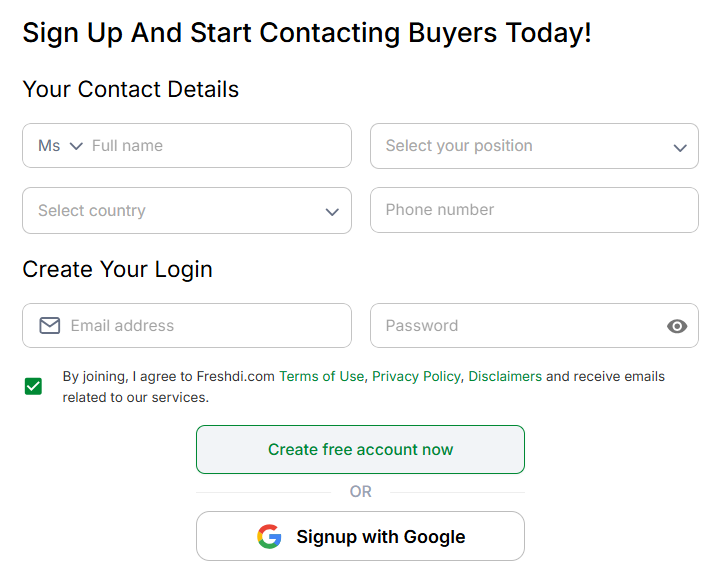
b. Enter information about your contact details
c. Create your password
***Step 3:***
a. Click on " Create free account now"
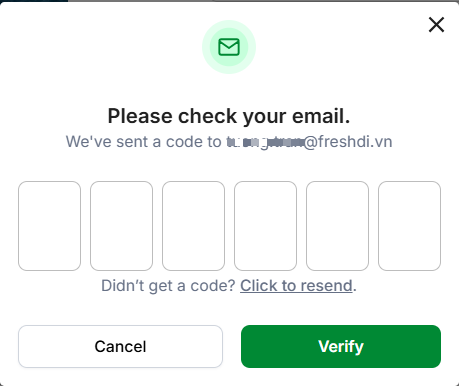
b. Check your email and enter OTP
c. Click on Verfy to successfully sign up on Freshdi.com
**2.Register an account quickly by using Google**
After entering your bussiness information, you could sign up on Freshdi by using Google account
### [🟢 **Sign up Now**](https://freshdi.com/register?direct-url=aHR0cHM6Ly9mcmVzaGRpLmNvbS8=)
> Create your free Supplier account and start showcasing your products to global buyers.
### 🟢[ Find Buyers](https://freshdi.com/buyers)
> Access verified buyer requests and connect directly with those looking for your products.
### 🟢 [Post Products](https://freshdi.com/business/products)
> Add your products to your store to get discovered by buyers searching on Freshdi.
### [🟢 **Verify Account**](https://freshdi.com/business/verification)
> Verify your phone, email, and business license to build trust and receive higher-quality leads.
### 🟢[ Become Premium](https://freshdi.com/membership-pricing)
> Upgrade to Premium to reach 300–3,000+ verified buyers monthly, unlock contact credits, and boost your visibility.